Looking to ditch ChatGPT, Gemini or another AI assistant for Claude? Anthropic has just introduced a memory import tool that it reckons does the job in under a minute.
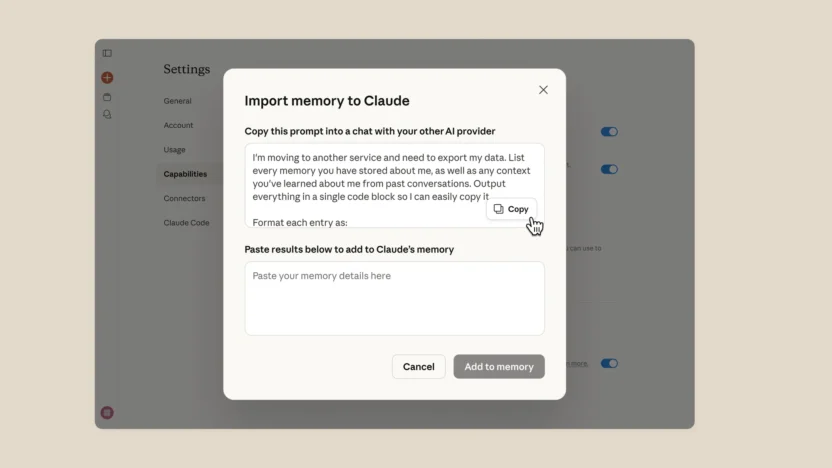
The new feature lets you transfer your preferences and context from other LLMs in a single copy-paste step.
It works by generating a prompt you paste into your existing AI chat, which produces a summary of your accumulated context. You then paste that output into Claude’s memory settings.
If you’ve spent months refining how an AI tool responds to you – adjusting tone, formatting preferences, areas of focus – switching platforms has meant rebuilding all of that from scratch.
You’ll need to be on a Pro plan to take advantage of the feature. Last month Anthropic beefed up its free Claude offering with Sonnet 4.6, making it easy to see if it’s worth upgrading before you commit.
Claude recently hit number one on the App Store productivity charts as Anthropic enjoys a moment of positive PR amid a run of negative stories around ChatGPT.
OpenAI’s announcement of a deal to deploy its models on the US Department of Defense’s classified network prompted a backlash among some users, with “Cancel ChatGPT” becoming a common refrain on social media.
Last month, OpenAI confirmed it is exploring advertising for some users, with example screenshots showing banner-style ads — a move that has unsettled subscribers who expected an ad-free experience.
OpenAI said the ads will not influence ChatGPT’s responses and that it will not share conversation data with advertisers.